
End-to-End High/Low voltage Design | Quality | Scaled Manufacturing

Development of a concept prototype for Ford Sync 3
| User Experience Design | User Interaction Design | High Fidelity Prototyping | Testing | Evaluation |
My roles include Contextual Inquiry, Personas, Ideation, Sketching, Wireframes, and Prototype.
About the project
The objective of the project was to identify an 'Unfriendly Interface' that could be improved in terms of 'User Requirements' by refreshing the existing design or by designing and developing a new design for a better user experience.

Problem statement
Selected Ford Sync 3 as our system with a need for design change by surveying data from various trusted sources who had reviewed the latest version of the SYNC 3 release while pointing out its shortcomings.
The most prominent issue was its unintuitive and oversimplified design along with its over reliance on voice and touch, lacking analog controls.
Statement: "Making Ford Sync 3 more appealing and intuitive while reducing the efforts of use."
 |  |  |
|---|---|---|
 |
Contextual Inquiry
Now that we had a problem statement, we wanted to know more about the pain points, preference, and thoughts of the millennial population out there.
We chose Contextual Inquiry for our user research to which our friends, colleagues and neighbors acted as subjects. As a team of two with a rough script, invited them to be seated in the car as we presented them with open ended questions about their daily driving, use of infotainment, most used feature, their emotions while using it, and about other areas such as what they would like to have, any particular skill necessary for its operation, etc.
 |  |
|---|
System Analysis: Main Features offered in Sync 3
Climate Control
Phone (Contacts, Dialer, Recent, Favourites)
Music (AM, FM, Bluetooth)
Maps (Satellite navigation)
Task Selection Rationale
5 subjects were asked to use the Ford Sync 3 system and identify 2 tasks that needed the most number of improvements.

User Personas


A 24 year old single male living in Dearborn Michigan who is an outgoing Patriots fan currently working at FORD. Drives a 2018 FORD Mustang.
Comment- “The Climate control in my infotainment is very basic and definitely needs an improvement ”
Abhilash Reddy
A 23 year old female living in Dearborn Michigan, currently works as a DATA analyst in FORD and drives a 2004 FORD FOCUS and a 2012 VW CC.
Comments - "The interface of VW Car-Net is visually appealing compared to the Ford's Sync."
Deekshita
A 31 year old single male living in Dearborn Michigan. Has a busy corporate life and currently drives a 2019 Ford Mustang.
Comments- "The call function in my infotainment is very tiring to operate, it needs too much of going back and forth to select a contact.”
Avinash
A 29 year old single male living in Dearborn Michigan, a former mechanical engineer at FORD who drives a 2006 MAZDA 3.
Comments- “Having previously owned a VW Jetta I think it had a vibrant infotainment compared to the Sync 3.”
Surya Khanapure

Tasks Selected
Task 1 : To make a call on the dialer using bluetooth connection.
Task Scenarios:
Emergency situations
Calling friends or family while driving back from work
User prefer fewer steps to make a call.

Task 2: To set the desired temperature using climate control
Task Scenario:
Before the start of a trip
As per the external weather conditions
As the preferences of temperature varies with every user, the system should comply and minimize confusion.
Storyboarding the situation
Henry and Kristina are two fictitious characters.
Situation 1: Henry is on his way to pick Kristina and wants to give her a call to check if she's ready.
Situation 2: Henry picks Kristina and they are on their way. Kristina feels the temperature is cold and wants to change the climate setting.

Original Ford Sync 3

Redesigned Dialer for concept Ford Sync 3
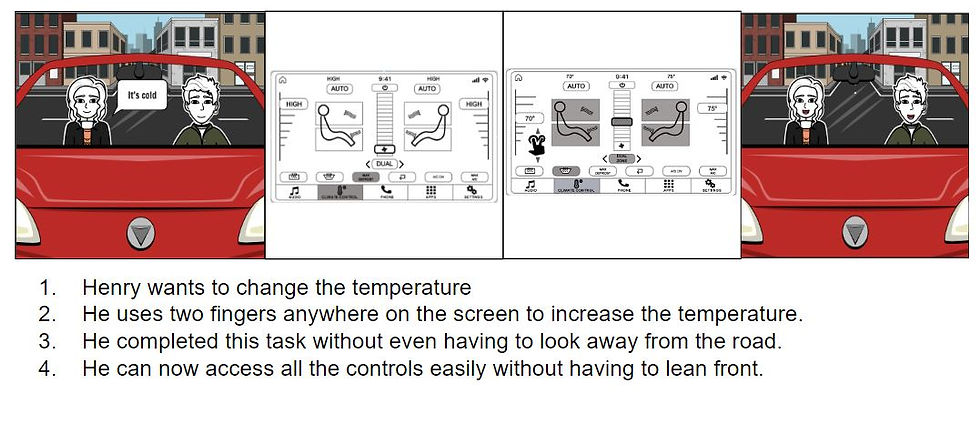
Redesigned Climate control screen for concept Ford Sync 3
Original Ford Sync 3
Ideation
Using the inputs from HMW as the base we started realizing ideas on paper having no bias or judgement towards anyone one form over other.
Several rounds of sketching, presenting and voting went through for hours until we could come up with the most voted, and feasible 'paper wireframe' before drafting a 'digital wireframe' using 'Adobe XD'.
 |  |  |
|---|---|---|
 |  |  |


Usability Testing
• Five subjects, both male and female of varying age group having a median age of 24.33 all holding a valid driver's license were asked to help us out with testing* the new interface.
• The users were given an iPad running the prototype on Adobe XD cloud.
• Two expert observers were deployed, one to observe and take notes and the other to resolve any queries that the user had while performing the tasks assigned.
• The testing methods used were 'Think Aloud' and 'Problem Discovery' moderated in-person along with a pre-evaluation survey to accumulate data on user demographics.
*"Each user was given fair amount of time to familiarise themselves to the system and were instructed on the tasks they were to perform as means of training."
 |  |  |
|---|---|---|
 |  |
Design Enhancements
 Design Enhancements- Dialer and Call scr |  Design Enhancement- Climate Controls |
|---|
Final Prototype Designs
The prototypes from before were changed to incorporate the design enhancements and were refreshed to match the requirements from the user feedback.


Conclusion
• The project was completed within a scheduled period of 3 months, from problem statement generation, data gathering, ideation, concept design to testing and final design. Due to the impact of COVID-19 pandemic towards the end of the project some of the final testing was conducted in remote.
• There is a lot of scope for future improvements. Firstly, a wider range of target users can be invited to participate in the evaluation giving more insights into the requirements and preventing any unconscious user bias possibilities. Secondly, more tests by expert reviewers will give insights to key improvements on a more detailed scale. Finally, due to device restrictions the three finger and two finger gesture was not utilized to its full potential which might have had an effect on the test results.
• Overall, the project worked on reducing the total effort on the driver and the passenger while operating the screen during commute or while parked in his/her comfortable seating position by reducing the total number of clicks, screen changes, and eye's-off road time which was evident from the results.